Wednesday, March 10, 2010

Chome and XSLT

I've built a web portal for my own use that integrates search engines, categorized favorite links and custom styled RSS feeds into a single page. It's a hodgepodge of ASP, VBScript and JavaScript with an XML as the backend and jQuery/UI to liven things up.

Initially working with FireFox as my default browser, everything was working fine until I decided to install Chrome. That when I got the error message: Extra content at end of document.


This gave me quite a headache until I traced it to the XSL processing in my JavaScript. I didn't quite understand what was causing the problem until I realized that Chrome didn't like what I was doing inside my {xsl:template}.

It turns out Chrome expects a only single child node (or document if you like) inside an xsl template and was complaining about anything coming after it. So you can't have this: (sorry about the curly braces, it seems blogger doesn't play nicely with code tags)

{xsl:template match="/rdf:RDF|/rss"}
{img src="...."}{/img}
{div}
...
{/div}
{xsl:template}

To fix this problem, all I did was wrap everything in another div.

{xsl:template match="/rdf:RDF|/rss"}
{div}
{img src="...."}
{div}
...
{/div}
{/div}
{xsl:template}

... et voila ...


Thursday, January 21, 2010

Hackintoshing

I installed OSX on my PC last year, and I thought I'd document what I did and what I went through to get it up and running, in case a future me decides to reinstall all over again, or install in another PC.

OSX is visually appealing, and although it's interface might take some getting used to when coming from a Windows background, its responsiveness and intuitiveness wins you over easily.

OSX is based off Darwin, which is a UNIX variant, and while there are many tools to help you setting up, sometimes you might have to go through a command line and sudo your way into the system, so it helps to brush up on unix commands.

Installing OSX on an x86 platform is possible now due to the fact that Apple switched from a PPC architecture to the x86, with Intel as its target. There are subtle differences between PC hardware and a Mac, and OSX is specifically designed for Mac hardware.

iDeneb contains many patches to get OSX running on your system, however as Hackintoshing is a very much experimental field, and with the variety of PC hardware out there, you might have a rig that is not 100% compatible with the distro and you will need to go hunting for drivers for your specific hardware.

Installer: iDeneb v1.1 10.5.4

System:
Intel Core 2 Duo E4500
ASUS P5B-MX WiFi MoBo
3GB RAM
Inno3D GeForce 8500 GT 512MB
Windows XP SP2 on C:\

First off, my DVD-ROM is broken, so I had to resort to using Leopard HD install helper. This tool will dump your ISO into a hard disk and make it bootable.

I partitioned my 2nd hard disk into

8GB - format as FAT32 (through command prompt in XP)
20GB - leave unformatted
The rest - data partition

Using the helper I installed the iDeneb ISO to the 8GB. The default options make the HDD bootable and add a "Mac OS X System" option to your windows XP boot menu.

Rebooting, I chose the second option in the boot menu and it booted into the Mac OSX installer.

Using Tools > Disk Utility I "erased" (formatted in OSX lingo) the 20GB with the Mac OSX Journaled partition type. Close the Disk Utility and select the 20GB from the choice of target HDDs.

Before continuing the installation I clicked the Customize button and set the following:

AMD patch: Not needed (Intel CPU)
Audio: AC97 (from mobo's built-in audio)
Fix: AppleSMBIOS: 800 (an article suggested ASUS mobos need this)
Video: None for now
Network: none for now:
Chipset: ICHx and JMicron
Other: OSX86Tools

I found out that the version of Firefox included was Italian, so I wouldn't recommend installing that right now.

Installer took 10-15 minutes then rebooted.

The chipset is important and should match your chipset, otherwise your OS will hang when booting.

Booting successfully into the OS you are greeted with the Mac "Welcome" video, after which you go through a wizard to adjust settings.

However (for me), when prompted whether to restore data from another Mac or from Time Machine, I of course chose not to do so, and the disk whirred and the busy icon came up and I was thrown all the way back to the Welcome video.

Some people say that you can get past this by re-enabling the serial and parallel ports and legacy usb in the BIOS.

If that doesn't work, you can bypass the first time setup by doing this:

When booting into OSX, you have 5 seconds to press any key to get the boot options command line. At the boot prompt, enter the option for single-user mode (with command line) and press enter.

> -s

At the root commandline, enter the following, waiting for the prompt to appear again before typing the next line:

> sbin/fsck -fy
> sbin/mount -uw /
> passwd root

Now enter the new root password and the confirmation. You won't see the password being typed.

This ensures the password is set so that we can login later. Now we create the file that notifies OSX that setup is complete:

> touch /var/db/.AppleSetupDone

Now reboot with the command:

> reboot

Instead of the welcome screen we get the login prompt for root. Go ahead and enter your password to login as Administrator. Since we skipped the user account creation in setup make sure to create your own Admin account in System Prefs > Accounts.

Now I have a working OSX installation, all I need to do is install the correct drivers. A bit of googling got me the drivers for my AttansicL1 ethernet. Drivers come in the form of Kernel Extensions (kext) which you can install using Applications > iDeneb tools > OSX86Tools.

I downloaded FireFox and Adobe Flash and got that working seamlessly, and I was browsing, facebooking and even playing FarmVille in no time, and with no problems.

Tuesday, April 7, 2009

Excel Office 2003 Documents opening as read-only in SharePoint

Recently I've been getting issues with users complaining that their old Excel files are now opening as Read-Only, and that in order to update the document they have to Save-As to their desktop then re-upload - which kind of defeats the purpose of SharePoint.

I've tried some of the recommended fixes from various sites, including the one from Microsoft which says that it won't work for Sharepoint (but other users say it does), and they just don't work on my machine. I don't want to try to do those fixes manually on the user's machines either.

In desperation I tried to find out exactly what was going on, using RegMon from Sysinternals.

What I found is that when a user clicks on a Document URL from the web, IE launches Excel using the OpenAsReadOnly shell command (by default).

By modifying the registry so that the command to Open as Read Only would essentially do the same thing as the regular Open command, I was able to workaround the situation, although for some users this was temporary - the next day something restored the settings back, and they had to run the registry hack again.

I don't know when Microsoft decided to change this policy of how documents are opened from the web, or how it was distributed to our network or our users. There are sites that say that this is by design, which begs the question, why did it work the way it did before?

I do agree that it should be fixed by using the Edit in Microsoft link, which incidentally launches an ActiveX object to open the document in Read/Write mode, but it just doesn't satisfy my curiosity as to how things were before they started working "as they should".

For anyone interested, I am on WinXP SP3, MS Office 2003 Standard Edition, with Compatibility Pack for the 2007 Office system (KB923505) installed.

Copy and paste the below into a text file and save as .REG:

Windows Registry Editor Version 5.00

[HKEY_CLASSES_ROOT\Excel.Sheet.8\shell\OpenAsReadOnly\command]@="\"C:\\Program Files\\Microsoft Office\\OFFICE11\\EXCEL.EXE\" /e"


Monday, March 23, 2009

Hiatus

I haven't done any programming in a while now. It's probably because the PSP plugin I was trying to make was totally pwned by another person's plugin.

The plugin is another attempt to allow a user to organize games and applications into folders on the PSP, and it does the job in a much better way both interactively and programatically, and I wave the white flag and now use it myself.

It's also because I can seem to find the time I need to really get into programming. I really don't want to break my time down for you in order to illustrate, but four hours of programming sometimes just doesn't seem to cut it in order to learn or make something useful.

Perhaps it's just that I don't have a focus right now.

So I've dropped programming for a while and now I'm going back to playing games.

Recently I've started playing Final Fantasy VIII again. It's one of the RPGs I've already finished, but more or less enjoyed enough the first time around to warrant a second playthrough.

The first time I played it, I was in college, and I only rented to play the game, so I didn't have much time to really get into it, nor did I finish it.

The savegame slept on my memory card until the day PSX emulation became feasible, and following instructions, I made a memory card reader out of a floppy disk connector and some instructions on the web.

The second time I played it, I between jobs and had so many games to play that I didn't really bother to spend the time to get to know the game that well.

I'm playing it on my PSP nowadays, more or less for nostalgia than the need to finish it. I could be spending more time on Patapon 2, but I've grown a bit tired of killing bosses over and over again in order to level up my army so I can go back to killing bosses over and over again.

Maybe it's my video card, but Resident Evil 4 gets me motion sick after a few minutes of play. Then again I was never really a fan of first-person-shooters.

I haven't touched Final Fantasy X in a while. I'm using PCSX2 to emulate it (I don't own a PS2), and fortunately my video card can crank enough polygons per second to make it playable.

It'd be nice to own a PS2 and play all those great games, but I can't bring myself to shell out some money to buy a second hand unit and some games with scratched or second-rate DVDs.

Maybe if someone sold me one for Php 4,000, I'd bite. But that's almost a new Inno3D GForce 9600 GTS DDR3.

Thing is, I'm not even much of an avid PC gamer.

*sigh*

Tuesday, March 10, 2009

Hitched!

After five years, we finally got married!

My dear Fransly and I tied the knot on February 28, 2009 at the Hearts of Jesus and Mary Parish Church, at West Triangle subdivision in Quezon City.

My father decided to come late to the church, but I didn't let that ruin the day for me. The road leading to the front of the church was torn up for repairs/renewal, but I didn't let that ruin the day for me.

The cloudless day brought a heat wave but also gave perfect lighting for picture-taking. Hats off to the Ariel Javelosa team for grabbing such lovely pictures. Thank you Max!

Reception was held at the Gazebo Royale's Champagne hall, where we surprised everyone (photographers especially) by running down the red carpet to the front of the pavillion where we had our first dance that rocked the crowd and really set the mood. I have Donna to thank for coreographing, and Tina and Onchit for joining us in the dance.

Dinner was quickly served. We didn't get to eat much with all the photos being taken, but everyone seemed to enjoy the food served by Eloquente, while Seren8 played our choice of music.

After the AVPs, the games, and everything to everyone's surprise I sang "Beautiful in My Eyes" and though I botched it a bit at the second stanza, nobody seemed to notice.

The deal was, Fransly wanted me to sing either that or "Danny's Song" (I really didn't want to sing the part "I think I'm gonna have a son" because then people might interpret it literally), but wanted it to be a "surprise", so she didn't know when I was going to sing.

I would have wanted to sing "The Way You Look Tonight" using Steve Tyrell's version, which IMO is more jaunty than the original or Buble's, since I know the lyrics better, I might not have botched it. Oh well.

Hitched! provided us with on-the-day wedding coordination and lots of help hooking us up with the wedding band and other details we missed. We couldn't have done it without you.

Partypics provided the photobooth which doubled as our souvenirs.

Overall, it was the best wedding I could have wished for.

To cap it off, we spent another day at the Linden suites, which I didn't really get to enjoy all that much as I had a really bad cough.

Finally, I must thank my dear wifey for rubbing her nose against mine and stealing that kiss (I know it was you!) If not for that fateful day, none of this would have happened, and I wouldn't be as happy as I am now.

Tuesday, December 30, 2008

Plugins for the PSP - 2

My efforts to ask for any help of the QJ.Net forums on hacking the PSP to add something similar to folders in the GAME menu created a rather lengthy thread that was filled with a lot of critiscm.

Eventually I posted some information that more or less showed that I knew what I was doing, and then the tides turned. Those who were telling me that what I was doing (disassembling the game_plugin module) was next to impossible, was silly, and was clearly the wrong approach, now nodded and said that what I had found was correct, and that they knew that information all along, and even offered me to join a group they were building devoted to hacking the VSH modules.

I don't really see why they are so uptight about sharing that information, when all the stuff they can actually do to hack the PSP was made possible by the sharing of information.

Anyway, I'm once again on my own. I've been a bit busy and I haven't had time to work on this. I shouldn't be spending so much time working on this project, as I'm about to get married in 2 months and there's a still lot of things that need planning and preparation.

With the slightest bit of help I have found the code that executes when the user selects a game, so I'm that much closer to realizing my goal. All I need to find know is how the code passes around the information containing the selected game, but finding this is a bit harder than I expected.

Wednesday, December 10, 2008

Plugins for the PSP

I've been working on a pet project of mine that I thought would be fun to do. I've been able to write and compile code for running on custom firmware on the PSP for a while now, but I haven't decided on what to do.

I've wanted to make a decent game, perhaps a bike-physics game clone of the one on teagames that I enjoyed so much playing during dull hours at the office, or a tower defense game with nice graphics and interesting weapons.

I've finally got more or less of a hang on the use of makefiles, enough that tweaking them a bit doesn't faze me like it used to. I don't exactly bother to write one from scratch though, as there are still some things I don't fully understand.

I've also enjoyed using plugins, which are really fantastic as it really lets you do so many more things with the PSP than what it can out-of-the-box.

So now I've tried to write my own plugin, based on an existing one, but with different features. It's been considered by some extremely difficult to put folders for games in the XMB. And I wholly agree.

But I've come up with an idea that might work.

When you place a folder in your /PSP/GAME folder that doesn't contain an EBOOT.PBP (the executable) , the XMB will display it as "Corrupted Data". This is just the way it's designed, zero levels deep.

There are plugins that allow you to categorize your games, and by placing them in different folders, you can select which category is currently active, and it displays only those games in the xmb.

These plugins use a button combination or a menu to select the category.

I thought of a way to let a folder show up in GAME, by spoofing an EBOOT when the firmware is trying to read the name and icon for the EBOOT.

The firmware tries to load an EBOOT for each folder it sees in /PSP/GAME. In the empty folder, it tries to load an EBOOT.PBP and as there is none, it fails and tells the firmware that the game is probably corrupt.

With my plugin in place, the code fails, but the plugin catches it and instead generates a fake EBOOT on the fly using the name of the folder and a default icon stored somewhere accessible, and tells the firmware everything is OK, don't worry, there is an EBOOT here.

Right now this is all the plugin does - it just allows folders to be displayed as EBOOTs in the XMB.

[screenshot goes here]

Now comes the hard part - intercepting when the user tries to open my fake EBOOT.

Normally the firmware tries to load the game, displaying the gameboot intro before launching the game.

What I need to do is catch the keypress before the firmware does, figure out what EBOOT the user is pointed at, check if it is one of mine, and if so, cancel loading the EBOOT and switch "categories" - folders really - and flush the memory stick cache.

This is where it gets interesting.

The PSP firmware is made up of several modules that load other modules as needed. The vshmain module (?) is the module that displays the top-level menu, the XMB.

When you select a top level item, vshmain (?) loads the approriate module - game_plugin in my case.

game_plugin is now responsible for reading the memory stick, drawing the icons, handling the menu. I'm not sure if it is entirely responsible though, it probably makes calls to other existing modules.

I makes sense that the game_plugin module contains a subroutine for checking if the user has pressed a button, or acting on button presses. What I need to do is patch the module to jump to my own code for checking button presses, before I call the original code.

As of now, I only have a fleeting understanding of how this can be done. With my previous knowlege of patching ROM code, I have some idea, but this is a 32-bit RISC platform with relocatable code, making things much more difficult for someone from a 8/16-bit fixed code background. There is probably some mechanism to locate the module's base entry point, and offset from there to some function.

I don't know how to find that function yet. But I have some ideas.

Learn MIPS assembly.

The module loads gameboot.pmf prior to launching the game. Look for the string gameboot.pmf, and to the code that references it and backtrack until you can find where the button presses are. Hopefully button polling/testing can be easily identified in assembly. (HAH!) NOPping out code is a time-honored method of isolating code.

Patch the code somewhere appropriate to jump to a function in my plugin.

This function needs to know what EBOOT the game_plugin module is currently "looking" at. Even after finding the right place to patch and patching the code, this is much more difficult to do. Perhaps the module's memory space contains an array of paths, and an index to the current entry.

Or perhaps there is a function that does this. With the caching that the XMB implements, this makes things much more difficult. Perhaps recoding a game_plugin is easier in the long run.

One thing fir sure, I would have learned a lot more by the time I'm done with this project, whether it is complete or not.

Tuesday, October 14, 2008

Dead and Alive

Few things that I can really count as strange happen to me.

I would have ignored the fact that my PSP inexplicably died on me, only to have it suddenly return to life, then intermittently work, and finally start working again. I would have relegated it to the perversity of the inanimate.

So it only served to raise the event to even higher levels of mystery when the same thing happened to someone else, at around the same time, and stranger still, to someone sharing my first name.

I'm just glad that my PSP is back and better (except for that piece of tape holding the LCD backlight flex cable to the connector)

Thursday, October 2, 2008

WiiMote in Action

As you know I got a WiiMote a few months a go for my birthday, but I haven't been using it lately. The lack of buttons makes it difficult to play Final Fantasy X, which is what I'm spending my gaming time on nowadays.

Well, here's a couple of videos of my WiiMote setup in action.

I hadn't setup the Wii "sensor" bar I DIY'd when I made these videos, so there's no point n' click action here yet.


TrackMania Sunrise


Portal

Wednesday, October 1, 2008

Doh!

Fans of Point-and-click games would do well to be aware that Broken Sword 2.5 is out! And it's totally free!

I love point-and-click games (and their precursor, the click-and-type games?) Never mind that I probably haven't solved one yet without the help of a walkthrough.

In fact, I can't wait to have kids, have them grow up a bit and so I can install a PC-based media center with a 42-inch LCD, (or will OLED be the display of choice in the far future?) WiiMotes and ScummVM installed, and introduce them to Those Games Their Father Played Back In Those Days, encouraging them to play them as they will be the only games installed on the PC, and declaring lazy Saturday afternoons as Family Point-and-Click Time.

Oh they will hate me.

When I heard Broken Sword 2.5 even existed, my first thought was - is it ScummVM compatible? Does it use the same engine even?

My second thought was - if it did, maybe I could play it on my...

PSP...

Doh!

(The happy music playing in my head slowed to a stop like an audio tape stuck in the mechanism. Audio tapes? How archaic...)

Returning Strings from WinAPI in VB.Net

I know this has been covered a lot in other places, but the things is, all their examples have failed to work for me. Here I offer another method, one that worked for me.

Declare Auto Function GetWindowText Lib "user32" Alias "GetWindowTextA" (ByVal hwnd As Integer, ByVal lpString As String, ByVal cch As Integer) As Integer

This is the usual declaration of the API function GetWindowText. As we know lpString should be marshalled as a LPCSTR, but according to this article, VB.Net doesn't allow you to specify the marshaling attribute on parameters, and purportedly the above declaration works just fine.

When I tried this version of the API call, using GetWindowTextLength to determine the length of the string to be filled with spaces before passing to GetWindowText, I ended up with a bunch of non-ASCII characters. When I tried using the MarshalAs attribute, all I got was an empty string of the "correct" length.

After some exasperation I decided that since the API was expecting a pointer to a string, I might as well give one, or the closest to one, a byte array. The declaration was then:

Declare Auto Function GetWindowText Lib "user32" Alias "GetWindowTextA" (ByVal hwnd As Integer, ByVal lpByteArray As Byte(), ByVal cch As Integer) As Integer

Then:

...
Dim Ret As Integer, sByte As Byte()
Ret = GetWindowTextLength(hwnd)
If Ret > 0 Then
ReDim sByte(Ret + 1)
lret = GetWindowText(hwnd, sByte, Ret + 1)
Return System.Text.Encoding.ASCII.GetString(sByte)
End if
...

Just as a sanity check (and before I found the Encoding.ASCII.GetString function), I stepped through the function to see what was being stored in sByte. They looked to be ASCII-flavored bytes (mmmm) so I looked for a function to convert them to a string, et voila!

I was actually expecting to be required to pass the first member of the byte array as a parameter to GetWindowText, but apparently .Net did the math and converted the byte array into a pointer of sorts.

I must admit I'm a bit new to .Net (two years of actual usage) and newer to managed and unmanaged code mixing, so I can't tell you that this is the right way to do it, but this method worked where others failed.

I'm on .NET 2003, in case you were wondering.

Tuesday, September 30, 2008

Woe is me - part deux

It's official - my PSP is really bricked.

I tried reviving it with Despertar del Cementerio, and initially it looked fine - the DC7 menu booted up, I selected the option to install firmware 4.01 M33, it went through the motions of formatting flash rom and installing the firmware.

But when it was all done I rebooted with a normal battery and it was still dead. Even trying to boot into the firmware off the memory stick (Test M33 option) produced the same results.

I have repartitioned, regen'ed the IDStorage, restored the NAND from corly's "clean" flashdump, all to no avail.

I have a brain-dead PSP. The heart works, but the head is empty. I'm still thinking of an explanation why it quit on me like that, all of a sudden.

I guess now I have to decide to give it a new lease on life, or let it go.

There is the third option to gut it and make a crude display adapter for it, or turn it into a digital frame. Good luck with that

Monday, September 29, 2008

Woe is me

Yesterday my girlfriend was towing me around while looking for a new pair of shoes, and while we were in one store, I plopped down on a sofa and whipped out my almost 1-year old PSP.

I was playing N+, and all of a sudden the unit just... died.

I thought, ok, it's just the battery, but I just charged it, so maybe its that RemoteJoyLite plugin -- it's always crashing --, I'll just do cold boot.

So I tried pulling the power switch up for ten seconds. The power LED turns green for a few seconds, then dies. I try it again. The same thing. I have never seen a bricked PSP before, but I hope that that is all it is - a corrupt firmware.

When I got home I try to plug in the AC adapter, to no avail. I went as far as disassembling my PSP. I got as far as removing the LCD frame, but it was almost morning and my girlfriend has work early, so after a few tries I finally got the PSP back together.

Right now I have my PSP with me, at the office. I was hoping to borrow somebody's PSP and make a Pandora battery.

I already have the magic memstick, so unbricking is my last course of action before having the unit fixed (which will cost me the half price of second-hand PSP phat, at least, that's what replacing the motherboard will cost me)

But in my rush not to get to work late, it seems I left the magic memstick at home, bugger that.

The thing is, I haved dropped my PSP (from about 1 foot), and it did fall a bit hard -- hard enough to somehow get the battery cover lock out, but still leave the whole PSP and battery cover lock mechanism intact.

I really wouldn't want to lose my PSP. It's almost a part of me, and 1 year isn't good enough for me to say goodbye to it yet. If I ever resurrect it I promise never to drop it, ever again.

I feel guilty for shelling out some money to fix it after my girlfriend has repeatedly told me how badly I treat it, I almost feel like I don't deserve to have it fixed.

But leaving it broken just doesn't feel right... and if it could never be fixed, I would at least like to scrap the LCD and build a driver for it, turn it into a digital frame or a mini monitor. Good luck with that though - Alexan doesn't even stock up on PICs, much less FPGAs.

If anyone has a phat compatible motherboard to sell (for cheap), let me know?

Tuesday, July 15, 2008

My new toy

My girlfriend got me an early gift for my birthday.


Yeah. No. Not a Wii, just the Wiimote.

I've been pining for one for the past few months, comparing everything to the price of a Wiimote, and she finally caved in and decided to get me one.

She probably didn't see the point in getting a Wiimote without the console, but I've been watching those videos and drooling with envy at the all geeky things you can do with a Wiimote and a PC with a Bluetooth adapter.

Installing the damn thing

My Bluetooth adapter is the cheapo Billionton BT-dongle that seems to do the job well enough.

It comes with IVT BlueSoleil drivers. My first try with this set of drivers kept me awake for most of the morning. The Wiimote was being detected, but GlovePIE and Wiinmote refused to detect it.

I got a copy of the BlueSoleil drivers v1.6.2.1, and these worked fine, but since my dongle was detected as an unlicensed device, I was only limited to 5MB data transfer before needing to restart BlueTooth.

GlovePIE and Wiinmote worked perfectly here, and before long I was playing TrackMania Sunrise with the Wiimote as a steering wheel,
and Portal with some difficulty.

Before long I exceeded the 5MB limit and my game of Portal was abruptly halted due to lack of control. This wouldn't do.

I finally tried going back to a newly downloaded copy of v1.6.1.4, and now BlueSoleil is not complaining about about an unlicensed device, while GlovePIE continue to work happily.

To get everything working you will need:


  • A BlueTooth dongle (BillionTon was used here)

  • Bluetooth drivers (BlueSoleil v1.6.1.4 was used here)

  • GlovePIE v???

  • PPPJoy

  • Some patience


I'll not post complete instuctions on how to set things up here. Google can help you find that.

Tuesday, June 10, 2008

Nostalgia Hack - Super UFO


This is a fairly useless hack - it simply makes the copier ROM playable on an emulator.

I did it for the nostalgia - the SNES unit my brother bought had a Super UFO. Needless to say, many summer nights were spent loading up games from this copier's menu.

What I did was basically NOP out instructions that were causing infinite loops, these were most likely disk access checks. I was also having trouble getting the sound to work until I discovered a routine that for some reason was copying the sound init code to non-existant memory (probably on-board custom RAM)

Strangely enough the code wasn't exactly self-modifying and could have been called from ROM instead, which is what I did.

The patched ROM doesn't play music initially for some reason - I might have NOPped out a bit more than needed - but the music can be set through the menu.

As I said, this is a fairly useless hack. If you never owned the Super UFO you probably won't appreciate this.

You nostalgic nerds can download the patch and ROM here.

UPDATE:

Found the problem why it wasn't working on Snes9xTYL for the PSP. Looks like there was a difference in what value was returned when reading from an undefined port in the different emulator versions.

Thursday, March 20, 2008

LCD Monitor Troubles

Remember my 19" Hanspree LCD monitor I got last Christmas?

Just today I noticed that it was developing horizontal streaks across the screen towards the right especially during sharp brightness level changes.

I was at work when Frans told me it was getting really bad, so I Googled and found an article that said frame rates above 60Hz weren't good for LCDs, so I had her reset it from 75 to 60. It seemed to fix it a little bit, but the streaks were still there.

In desperation I asked her to secure the monitor cable at the back of the LCD and the PC. She did so for the back of the LCD, and the problem went away.

Or so I thought...

UPDATE:

The source of the problem was a loose AC power cord. Some arcing was probably messing up the timing circuits and causing the streaks. After securing the power cord, the screen was back to normal.

Phew

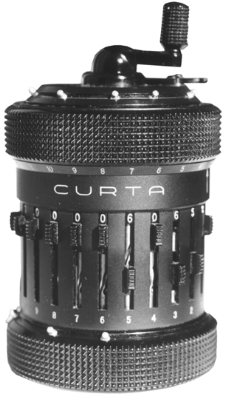
Steampunk Calculator

This isn't technically steampunk, nor was it invented in Victorian-era England, but with a few brass trimmings, it would fit right in. And...


...It could fit right in your pocket!


Friday, March 14, 2008

Willow Hack - Almost There

The main part of this hack - setting aside some SRAM to save to and load from, the actual routines for accomplishing this, and the basic interface to select from 3 slots where to save or load - is complete.

I still need to write a routine that displays Willow's stats for each save game, and do something better than SELECT+B in order to access the save menu. There is also a bug where the background music isn't restored after leaving the save menu.

I also did a few kludges to make things work, such as shamelessly copy/pasting some code from other parts of the code without knowing exactly what the function calls did. Seems to work fine though.

I also need to check if I've overwritten any code that shouldn't be. Fortunately (I noticed) the assembler does export symbols from the source. This means that any labels I've used in the source code are noted down along with their memory locations in the ROM. By placing labels at the end of functions and data tables, I can compare with the original disassembly and find out if I've overrun any code.

I also noticed and rooted out a little bug where the stack head kept moving up after selecting continue. Turns out the original code forced a stack reset which I failed to include (yes, copy/paste). Although there seemed to be no ill effects right off, it might have caused problems after the player continued 20 or so times.

However aside from the savegame text and a few bugs, there are a few things I want to add before I call this patch finished and release it into the world.

I want to add the name of the area into the save game, just so the player knows more-or-less where he left off, and a percent complete value would be nice. I suppose the calculation for percent completed would be computed from the items Willow has acquired. Then there's a minor hack to the saver/loader routines which should use a checksum to verify if the savegame is valid or corrupt.

One last thing, I'd like to add my name into the credits on the PRESS START screen, but the data is tightly packed with no free memory right after it, so my last hack will entail either moving that bit of data into some place more agreeable, or add and extend the "string" writing code to allow jumping to another location in memory. Right now I've just shamelessly replaced the TM & © "LUCASFILM" with "ENDERSOFT".

For now, here's what the selection screen will look like. The data is actually a mock-up - no values are read from SRAM - but the screen is actually running off the emulator (i.e. no Photoshop tricks)

Monday, March 10, 2008

Willow Hack News

I'm in the middle of unraveling the code to draw the backgrounds used for the START and PASSWORD screens.

Interestingly, it uses the same routines for drawing the in-game backgrounds. This is the background you see when walking through the game as Willow.

Now this routine uses two variables to specify what background is loaded to be scrolled into the screen while Willow walks to the edge of the visible screen.

  • Each variable seems to change independent of each other
  • One variable changes if Willow walks out the top/bottom of the screen, I designate this as mapY.
  • The other variable changes if Willow walks out left/right of the screen, I designate this as mapX.
  • The variables don't seem to be a direct index, as useful values seem to be in the 1A-1F range.

The "coordinates" for the START screen is (1A,1E). I'm not sure where the password screen is stored yet. When switching to the password screen, no backgrounds are drawn (i.e. the code for drawing backgrounds is not called). Instead, the code merely switches the active nametable implying that the password screen is already drawn into memory.

So far I've determined that these values decode into a memory address where the code picks up another byte that decodes into another address, which is where the char which will be copied to the nametable is stored. I still haven't fully decoded the routine, but it's another step towards finalization.

I think it uses some form of compression in order to save space, as the routine seems to read from certain locations multiple times, instead of simple packed data. It is probably RLE, which would be ideal given the repetative nature of the backgrounds.

Meanwhile, I think I should focus on what can be done, which is implementing the load/save screens - sans backgrounds - and adding support for multiple saves.

I just feel so close to understanding how it works that I don't want to let it by.

Wednesday, March 5, 2008

Willow Hack: Update

Remember how I said I wanted a feature to "skip" the dialog in WIllow? I really meant, make it print faster. Well, I was looking through the code today, trying to make sense of it all when I came upon some code that seemed to be reading the joystick in the dialog routine.

Aha! I thought, and noticed that the bit being tested was the one for the up button. That's when I "remembered" that in order to speed up the dialog you had to hold Up on the D-Pad. I thought this "Up" business to skip dialog was a bit silly when it's almost universally held that the B button was for "cancelling". So I remapped it to B.

I also stumbled upon how it draws text to the screen, and isolated a function call that seems to draw the background.

A little more work will be needed disassembling all this twisting code before I can figure out how it does the backgrounds. When that's done, I can be on my way to writing the Load / Save screens, and making this Proof-of-concept a full working patch!