I know this has been covered a lot in other places, but the things is, all their examples have failed to work for me. Here I offer another method, one that worked for me.
Declare Auto Function GetWindowText Lib "user32" Alias "GetWindowTextA" (ByVal hwnd As Integer, ByVal lpString As String, ByVal cch As Integer) As Integer
This is the usual declaration of the API function GetWindowText. As we know lpString should be marshalled as a LPCSTR, but according to this article, VB.Net doesn't allow you to specify the marshaling attribute on parameters, and purportedly the above declaration works just fine.
When I tried this version of the API call, using GetWindowTextLength to determine the length of the string to be filled with spaces before passing to GetWindowText, I ended up with a bunch of non-ASCII characters. When I tried using the MarshalAs attribute, all I got was an empty string of the "correct" length.
After some exasperation I decided that since the API was expecting a pointer to a string, I might as well give one, or the closest to one, a byte array. The declaration was then:
Declare Auto Function GetWindowText Lib "user32" Alias "GetWindowTextA" (ByVal hwnd As Integer, ByVal lpByteArray As Byte(), ByVal cch As Integer) As Integer
Then:
...
Dim Ret As Integer, sByte As Byte()
Ret = GetWindowTextLength(hwnd)
If Ret > 0 Then
ReDim sByte(Ret + 1)
lret = GetWindowText(hwnd, sByte, Ret + 1)
Return System.Text.Encoding.ASCII.GetString(sByte)
End if
...
Just as a sanity check (and before I found the Encoding.ASCII.GetString function), I stepped through the function to see what was being stored in sByte. They looked to be ASCII-flavored bytes (mmmm) so I looked for a function to convert them to a string, et voila!
I was actually expecting to be required to pass the first member of the byte array as a parameter to GetWindowText, but apparently .Net did the math and converted the byte array into a pointer of sorts.
I must admit I'm a bit new to .Net (two years of actual usage) and newer to managed and unmanaged code mixing, so I can't tell you that this is the right way to do it, but this method worked where others failed.
I'm on .NET 2003, in case you were wondering.
Wednesday, October 1, 2008

Tuesday, September 30, 2008
Woe is me - part deux
It's official - my PSP is really bricked.
I tried reviving it with Despertar del Cementerio, and initially it looked fine - the DC7 menu booted up, I selected the option to install firmware 4.01 M33, it went through the motions of formatting flash rom and installing the firmware.
But when it was all done I rebooted with a normal battery and it was still dead. Even trying to boot into the firmware off the memory stick (Test M33 option) produced the same results.
I have repartitioned, regen'ed the IDStorage, restored the NAND from corly's "clean" flashdump, all to no avail.
I have a brain-dead PSP. The heart works, but the head is empty. I'm still thinking of an explanation why it quit on me like that, all of a sudden.
I guess now I have to decide to give it a new lease on life, or let it go.
There is the third option to gut it and make a crude display adapter for it, or turn it into a digital frame. Good luck with that
I tried reviving it with Despertar del Cementerio, and initially it looked fine - the DC7 menu booted up, I selected the option to install firmware 4.01 M33, it went through the motions of formatting flash rom and installing the firmware.
But when it was all done I rebooted with a normal battery and it was still dead. Even trying to boot into the firmware off the memory stick (Test M33 option) produced the same results.
I have repartitioned, regen'ed the IDStorage, restored the NAND from corly's "clean" flashdump, all to no avail.
I have a brain-dead PSP. The heart works, but the head is empty. I'm still thinking of an explanation why it quit on me like that, all of a sudden.
I guess now I have to decide to give it a new lease on life, or let it go.
There is the third option to gut it and make a crude display adapter for it, or turn it into a digital frame. Good luck with that
Monday, September 29, 2008
Woe is me
Yesterday my girlfriend was towing me around while looking for a new pair of shoes, and while we were in one store, I plopped down on a sofa and whipped out my almost 1-year old PSP.
I was playing N+, and all of a sudden the unit just... died.
I thought, ok, it's just the battery, but I just charged it, so maybe its that RemoteJoyLite plugin -- it's always crashing --, I'll just do cold boot.
So I tried pulling the power switch up for ten seconds. The power LED turns green for a few seconds, then dies. I try it again. The same thing. I have never seen a bricked PSP before, but I hope that that is all it is - a corrupt firmware.
When I got home I try to plug in the AC adapter, to no avail. I went as far as disassembling my PSP. I got as far as removing the LCD frame, but it was almost morning and my girlfriend has work early, so after a few tries I finally got the PSP back together.
Right now I have my PSP with me, at the office. I was hoping to borrow somebody's PSP and make a Pandora battery.
I already have the magic memstick, so unbricking is my last course of action before having the unit fixed (which will cost me the half price of second-hand PSP phat, at least, that's what replacing the motherboard will cost me)
But in my rush not to get to work late, it seems I left the magic memstick at home, bugger that.
The thing is, I haved dropped my PSP (from about 1 foot), and it did fall a bit hard -- hard enough to somehow get the battery cover lock out, but still leave the whole PSP and battery cover lock mechanism intact.
I really wouldn't want to lose my PSP. It's almost a part of me, and 1 year isn't good enough for me to say goodbye to it yet. If I ever resurrect it I promise never to drop it, ever again.
I feel guilty for shelling out some money to fix it after my girlfriend has repeatedly told me how badly I treat it, I almost feel like I don't deserve to have it fixed.
But leaving it broken just doesn't feel right... and if it could never be fixed, I would at least like to scrap the LCD and build a driver for it, turn it into a digital frame or a mini monitor. Good luck with that though - Alexan doesn't even stock up on PICs, much less FPGAs.
If anyone has a phat compatible motherboard to sell (for cheap), let me know?
I was playing N+, and all of a sudden the unit just... died.
I thought, ok, it's just the battery, but I just charged it, so maybe its that RemoteJoyLite plugin -- it's always crashing --, I'll just do cold boot.
So I tried pulling the power switch up for ten seconds. The power LED turns green for a few seconds, then dies. I try it again. The same thing. I have never seen a bricked PSP before, but I hope that that is all it is - a corrupt firmware.
When I got home I try to plug in the AC adapter, to no avail. I went as far as disassembling my PSP. I got as far as removing the LCD frame, but it was almost morning and my girlfriend has work early, so after a few tries I finally got the PSP back together.
Right now I have my PSP with me, at the office. I was hoping to borrow somebody's PSP and make a Pandora battery.
I already have the magic memstick, so unbricking is my last course of action before having the unit fixed (which will cost me the half price of second-hand PSP phat, at least, that's what replacing the motherboard will cost me)
But in my rush not to get to work late, it seems I left the magic memstick at home, bugger that.
The thing is, I haved dropped my PSP (from about 1 foot), and it did fall a bit hard -- hard enough to somehow get the battery cover lock out, but still leave the whole PSP and battery cover lock mechanism intact.
I really wouldn't want to lose my PSP. It's almost a part of me, and 1 year isn't good enough for me to say goodbye to it yet. If I ever resurrect it I promise never to drop it, ever again.
I feel guilty for shelling out some money to fix it after my girlfriend has repeatedly told me how badly I treat it, I almost feel like I don't deserve to have it fixed.
But leaving it broken just doesn't feel right... and if it could never be fixed, I would at least like to scrap the LCD and build a driver for it, turn it into a digital frame or a mini monitor. Good luck with that though - Alexan doesn't even stock up on PICs, much less FPGAs.
If anyone has a phat compatible motherboard to sell (for cheap), let me know?
Tuesday, July 15, 2008
My new toy
My girlfriend got me an early gift for my birthday.

Yeah. No. Not a Wii, just the Wiimote.
I've been pining for one for the past few months, comparing everything to the price of a Wiimote, and she finally caved in and decided to get me one.
She probably didn't see the point in getting a Wiimote without the console, but I've been watching those videos and drooling with envy at the all geeky things you can do with a Wiimote and a PC with a Bluetooth adapter.
Installing the damn thing
My Bluetooth adapter is the cheapo Billionton BT-dongle that seems to do the job well enough.
It comes with IVT BlueSoleil drivers. My first try with this set of drivers kept me awake for most of the morning. The Wiimote was being detected, but GlovePIE and Wiinmote refused to detect it.
I got a copy of the BlueSoleil drivers v1.6.2.1, and these worked fine, but since my dongle was detected as an unlicensed device, I was only limited to 5MB data transfer before needing to restart BlueTooth.
GlovePIE and Wiinmote worked perfectly here, and before long I was playing TrackMania Sunrise with the Wiimote as a steering wheel,
and Portal with some difficulty.
Before long I exceeded the 5MB limit and my game of Portal was abruptly halted due to lack of control. This wouldn't do.
I finally tried going back to a newly downloaded copy of v1.6.1.4, and now BlueSoleil is not complaining about about an unlicensed device, while GlovePIE continue to work happily.
To get everything working you will need:
I'll not post complete instuctions on how to set things up here. Google can help you find that.
Yeah. No. Not a Wii, just the Wiimote.
I've been pining for one for the past few months, comparing everything to the price of a Wiimote, and she finally caved in and decided to get me one.
She probably didn't see the point in getting a Wiimote without the console, but I've been watching those videos and drooling with envy at the all geeky things you can do with a Wiimote and a PC with a Bluetooth adapter.
Installing the damn thing
My Bluetooth adapter is the cheapo Billionton BT-dongle that seems to do the job well enough.
It comes with IVT BlueSoleil drivers. My first try with this set of drivers kept me awake for most of the morning. The Wiimote was being detected, but GlovePIE and Wiinmote refused to detect it.
I got a copy of the BlueSoleil drivers v1.6.2.1, and these worked fine, but since my dongle was detected as an unlicensed device, I was only limited to 5MB data transfer before needing to restart BlueTooth.
GlovePIE and Wiinmote worked perfectly here, and before long I was playing TrackMania Sunrise with the Wiimote as a steering wheel,
and Portal with some difficulty.
Before long I exceeded the 5MB limit and my game of Portal was abruptly halted due to lack of control. This wouldn't do.
I finally tried going back to a newly downloaded copy of v1.6.1.4, and now BlueSoleil is not complaining about about an unlicensed device, while GlovePIE continue to work happily.
To get everything working you will need:
- A BlueTooth dongle (BillionTon was used here)
- Bluetooth drivers (BlueSoleil v1.6.1.4 was used here)
- GlovePIE v???
- PPPJoy
- Some patience
I'll not post complete instuctions on how to set things up here. Google can help you find that.
Tuesday, June 10, 2008
Nostalgia Hack - Super UFO


I did it for the nostalgia - the SNES unit my brother bought had a Super UFO. Needless to say, many summer nights were spent loading up games from this copier's menu.
What I did was basically NOP out instructions that were causing infinite loops, these were most likely disk access checks. I was also having trouble getting the sound to work until I discovered a routine that for some reason was copying the sound init code to non-existant memory (probably on-board custom RAM)
Strangely enough the code wasn't exactly self-modifying and could have been called from ROM instead, which is what I did.
The patched ROM doesn't play music initially for some reason - I might have NOPped out a bit more than needed - but the music can be set through the menu.
As I said, this is a fairly useless hack. If you never owned the Super UFO you probably won't appreciate this.
You nostalgic nerds can download the patch and ROM here.
UPDATE:
Found the problem why it wasn't working on Snes9xTYL for the PSP. Looks like there was a difference in what value was returned when reading from an undefined port in the different emulator versions.
Thursday, March 20, 2008
LCD Monitor Troubles
Remember my 19" Hanspree LCD monitor I got last Christmas?
Just today I noticed that it was developing horizontal streaks across the screen towards the right especially during sharp brightness level changes.
I was at work when Frans told me it was getting really bad, so I Googled and found an article that said frame rates above 60Hz weren't good for LCDs, so I had her reset it from 75 to 60. It seemed to fix it a little bit, but the streaks were still there.
In desperation I asked her to secure the monitor cable at the back of the LCD and the PC. She did so for the back of the LCD, and the problem went away.
Or so I thought...
UPDATE:
The source of the problem was a loose AC power cord. Some arcing was probably messing up the timing circuits and causing the streaks. After securing the power cord, the screen was back to normal.
Phew
Just today I noticed that it was developing horizontal streaks across the screen towards the right especially during sharp brightness level changes.
I was at work when Frans told me it was getting really bad, so I Googled and found an article that said frame rates above 60Hz weren't good for LCDs, so I had her reset it from 75 to 60. It seemed to fix it a little bit, but the streaks were still there.
In desperation I asked her to secure the monitor cable at the back of the LCD and the PC. She did so for the back of the LCD, and the problem went away.
Or so I thought...
UPDATE:
The source of the problem was a loose AC power cord. Some arcing was probably messing up the timing circuits and causing the streaks. After securing the power cord, the screen was back to normal.
Phew
Steampunk Calculator
This isn't technically steampunk, nor was it invented in Victorian-era England, but with a few brass trimmings, it would fit right in. And...


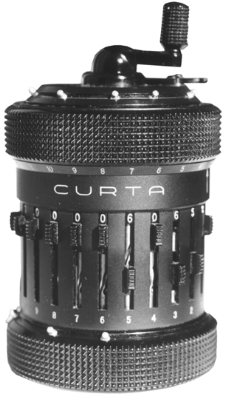
...It could fit right in your pocket!

Friday, March 14, 2008
Willow Hack - Almost There
The main part of this hack - setting aside some SRAM to save to and load from, the actual routines for accomplishing this, and the basic interface to select from 3 slots where to save or load - is complete.
I still need to write a routine that displays Willow's stats for each save game, and do something better than SELECT+B in order to access the save menu. There is also a bug where the background music isn't restored after leaving the save menu.
I also did a few kludges to make things work, such as shamelessly copy/pasting some code from other parts of the code without knowing exactly what the function calls did. Seems to work fine though.
I also need to check if I've overwritten any code that shouldn't be. Fortunately (I noticed) the assembler does export symbols from the source. This means that any labels I've used in the source code are noted down along with their memory locations in the ROM. By placing labels at the end of functions and data tables, I can compare with the original disassembly and find out if I've overrun any code.
I also noticed and rooted out a little bug where the stack head kept moving up after selecting continue. Turns out the original code forced a stack reset which I failed to include (yes, copy/paste). Although there seemed to be no ill effects right off, it might have caused problems after the player continued 20 or so times.
However aside from the savegame text and a few bugs, there are a few things I want to add before I call this patch finished and release it into the world.
I want to add the name of the area into the save game, just so the player knows more-or-less where he left off, and a percent complete value would be nice. I suppose the calculation for percent completed would be computed from the items Willow has acquired. Then there's a minor hack to the saver/loader routines which should use a checksum to verify if the savegame is valid or corrupt.
One last thing, I'd like to add my name into the credits on the PRESS START screen, but the data is tightly packed with no free memory right after it, so my last hack will entail either moving that bit of data into some place more agreeable, or add and extend the "string" writing code to allow jumping to another location in memory. Right now I've just shamelessly replaced the TM & © "LUCASFILM" with "ENDERSOFT".
For now, here's what the selection screen will look like. The data is actually a mock-up - no values are read from SRAM - but the screen is actually running off the emulator (i.e. no Photoshop tricks)

I still need to write a routine that displays Willow's stats for each save game, and do something better than SELECT+B in order to access the save menu. There is also a bug where the background music isn't restored after leaving the save menu.
I also did a few kludges to make things work, such as shamelessly copy/pasting some code from other parts of the code without knowing exactly what the function calls did. Seems to work fine though.
I also need to check if I've overwritten any code that shouldn't be. Fortunately (I noticed) the assembler does export symbols from the source. This means that any labels I've used in the source code are noted down along with their memory locations in the ROM. By placing labels at the end of functions and data tables, I can compare with the original disassembly and find out if I've overrun any code.
I also noticed and rooted out a little bug where the stack head kept moving up after selecting continue. Turns out the original code forced a stack reset which I failed to include (yes, copy/paste). Although there seemed to be no ill effects right off, it might have caused problems after the player continued 20 or so times.
However aside from the savegame text and a few bugs, there are a few things I want to add before I call this patch finished and release it into the world.
I want to add the name of the area into the save game, just so the player knows more-or-less where he left off, and a percent complete value would be nice. I suppose the calculation for percent completed would be computed from the items Willow has acquired. Then there's a minor hack to the saver/loader routines which should use a checksum to verify if the savegame is valid or corrupt.
One last thing, I'd like to add my name into the credits on the PRESS START screen, but the data is tightly packed with no free memory right after it, so my last hack will entail either moving that bit of data into some place more agreeable, or add and extend the "string" writing code to allow jumping to another location in memory. Right now I've just shamelessly replaced the TM & © "LUCASFILM" with "ENDERSOFT".
For now, here's what the selection screen will look like. The data is actually a mock-up - no values are read from SRAM - but the screen is actually running off the emulator (i.e. no Photoshop tricks)

Monday, March 10, 2008
Willow Hack News
I'm in the middle of unraveling the code to draw the backgrounds used for the START and PASSWORD screens.
Interestingly, it uses the same routines for drawing the in-game backgrounds. This is the background you see when walking through the game as Willow.
Now this routine uses two variables to specify what background is loaded to be scrolled into the screen while Willow walks to the edge of the visible screen.
The "coordinates" for the START screen is (1A,1E). I'm not sure where the password screen is stored yet. When switching to the password screen, no backgrounds are drawn (i.e. the code for drawing backgrounds is not called). Instead, the code merely switches the active nametable implying that the password screen is already drawn into memory.
So far I've determined that these values decode into a memory address where the code picks up another byte that decodes into another address, which is where the char which will be copied to the nametable is stored. I still haven't fully decoded the routine, but it's another step towards finalization.
I think it uses some form of compression in order to save space, as the routine seems to read from certain locations multiple times, instead of simple packed data. It is probably RLE, which would be ideal given the repetative nature of the backgrounds.
Meanwhile, I think I should focus on what can be done, which is implementing the load/save screens - sans backgrounds - and adding support for multiple saves.
I just feel so close to understanding how it works that I don't want to let it by.
Interestingly, it uses the same routines for drawing the in-game backgrounds. This is the background you see when walking through the game as Willow.
Now this routine uses two variables to specify what background is loaded to be scrolled into the screen while Willow walks to the edge of the visible screen.
- Each variable seems to change independent of each other
- One variable changes if Willow walks out the top/bottom of the screen, I designate this as mapY.
- The other variable changes if Willow walks out left/right of the screen, I designate this as mapX.
- The variables don't seem to be a direct index, as useful values seem to be in the 1A-1F range.
The "coordinates" for the START screen is (1A,1E). I'm not sure where the password screen is stored yet. When switching to the password screen, no backgrounds are drawn (i.e. the code for drawing backgrounds is not called). Instead, the code merely switches the active nametable implying that the password screen is already drawn into memory.
So far I've determined that these values decode into a memory address where the code picks up another byte that decodes into another address, which is where the char which will be copied to the nametable is stored. I still haven't fully decoded the routine, but it's another step towards finalization.
I think it uses some form of compression in order to save space, as the routine seems to read from certain locations multiple times, instead of simple packed data. It is probably RLE, which would be ideal given the repetative nature of the backgrounds.
Meanwhile, I think I should focus on what can be done, which is implementing the load/save screens - sans backgrounds - and adding support for multiple saves.
I just feel so close to understanding how it works that I don't want to let it by.
Wednesday, March 5, 2008
Willow Hack: Update
Remember how I said I wanted a feature to "skip" the dialog in WIllow? I really meant, make it print faster. Well, I was looking through the code today, trying to make sense of it all when I came upon some code that seemed to be reading the joystick in the dialog routine.
Aha! I thought, and noticed that the bit being tested was the one for the up button. That's when I "remembered" that in order to speed up the dialog you had to hold Up on the D-Pad. I thought this "Up" business to skip dialog was a bit silly when it's almost universally held that the B button was for "cancelling". So I remapped it to B.
I also stumbled upon how it draws text to the screen, and isolated a function call that seems to draw the background.
A little more work will be needed disassembling all this twisting code before I can figure out how it does the backgrounds. When that's done, I can be on my way to writing the Load / Save screens, and making this Proof-of-concept a full working patch!
Aha! I thought, and noticed that the bit being tested was the one for the up button. That's when I "remembered" that in order to speed up the dialog you had to hold Up on the D-Pad. I thought this "Up" business to skip dialog was a bit silly when it's almost universally held that the B button was for "cancelling". So I remapped it to B.
I also stumbled upon how it draws text to the screen, and isolated a function call that seems to draw the background.
A little more work will be needed disassembling all this twisting code before I can figure out how it does the backgrounds. When that's done, I can be on my way to writing the Load / Save screens, and making this Proof-of-concept a full working patch!
Subscribe to:
Posts (Atom)
